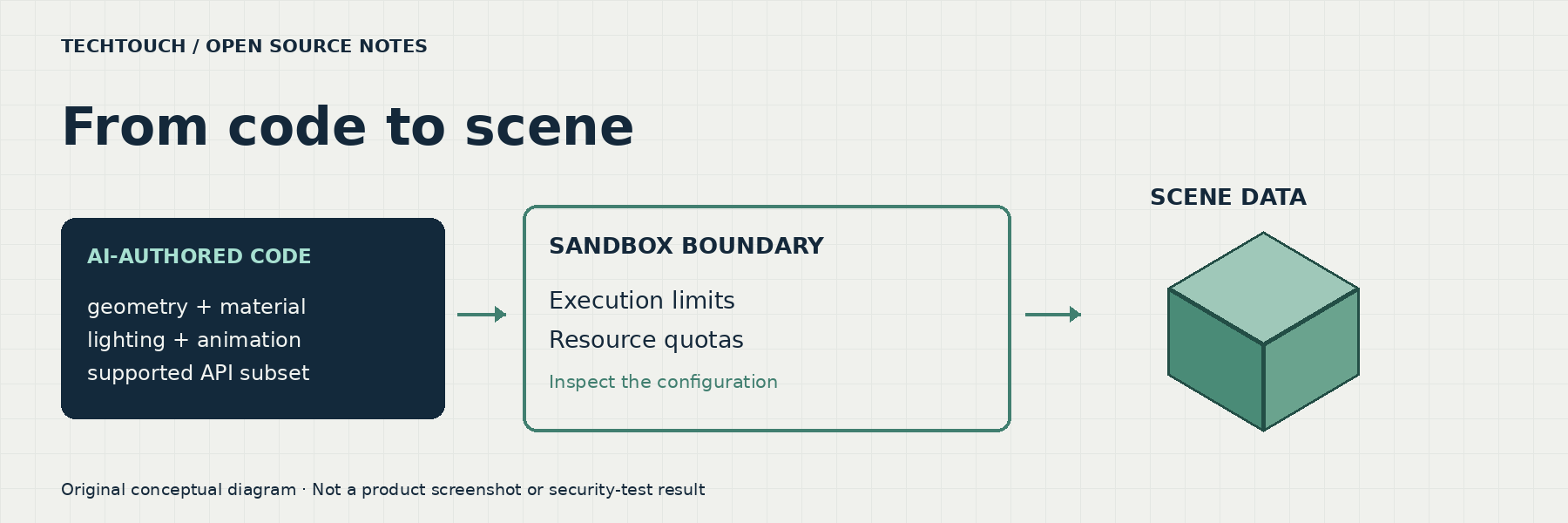
Original TechTouch diagram: scene code crosses a sandbox boundary into 3D data; not a Three-Live screenshot
Original TechTouch diagram: scene code crosses a sandbox boundary into 3D data; not a Three-Live screenshotOriginal image: TechTouch ↗
OPEN SOURCE · 3D AND AI

Three-Live explained: moving AI-authored 3D code across web and mobile with a sandbox

How Three-Live separates scene creation from rendering, why sandbox boundaries matter, and why the November 3 blog is not a substitute for version-matched documentation.

Google Open Source Blog featured Three-Live on November 3, 2026 as a way to bring AI-authored Three.js scenes across platforms. It separates script execution from rendering, but documentation versions use different status labels and examples. Developers should match the guide to the version they evaluate.

The key points

  • Separate source code, scene data and rendering
  • Match examples to a pinned version
  • Open source is not a blanket security guarantee

A scene description is different from unrestricted JavaScript

The announcement treats a subset of Three.js as a description of geometry, materials, lighting and animation.

TechTouch analysis: the authority to describe a scene should be separate from the authority of the application displaying it. Asking AI to create an object is not a reason to grant the resulting script broad access to user data or the network. Make that distinction before choosing an integration path.

A sandbox is a boundary to examine

The README describes web Workers or an opaque-origin iframe, removed network/storage globals and resource limits.

TechTouch recommendation: check the configuration actually enabled. Do not move a generated script into eval on the main page. A sandbox in the architecture does not establish that every integration closes its escape paths. Start in an environment without sensitive data and make rejected operations observable.

An intermediate asset separates construction from display

The reference describes GLB and USDZ export, with web, Android and Apple rendering paths.

TechTouch analysis: a scene asset provides an inspection point before display. It does not establish identical appearance across devices. Define separate acceptance cases for lighting, materials, animation and AR entry on each target, especially when a device lacks a required capability. Keep an ordinary viewing path available when the immersive path is unavailable.

A blog date is not necessarily the first release date

The November 3 post calls v1.0.0 a Developer Preview; the inspected changelog dates v1.0.0 to October 6, and the current README labels the project Beta. We therefore do not report November 3 as its first release date.

TechTouch recommendation: preserve a tag and matching documentation together. Examples and bundle sizes in an older introduction are not assurances about the current build.

Start with one object and a reproducible check

Consider this TechTouch evaluation approach: begin with one box and explicit units, dimensions, material and camera. Check its bounding box and exported result before adding animation. Then exercise malformed input, an oversized scene and cancellation during processing. Record whether failures are controlled. This separates script, compiler and renderer problems instead of changing all three at once. These are proposed acceptance cases, not a benchmark or a claim that we executed the project.

Evaluate the maintenance commitment alongside the demo

The project uses Apache-2.0; the blog author explicitly says it is not an officially supported Google product.

TechTouch analysis: a team considering a viewer or scene-authoring tool should assess dependency maintenance and target-device support before production use. Documentation was checked November 8. We did not execute AI-authored code or perform a Three-Live security or performance assessment for this report.

Details and limitations

LayerQuestionEvidence to check
ScriptWhat may it do?Supported API and sandbox boundary
SceneCan geometry exceed the budget?Resource limits and exported output
RendererDo targets behave consistently?Separate browser and device checks

Things to know and check

  • Pin a version and use matching documentation
  • Inspect the sandbox and resource limits
  • Check exported scenes before integration
  • Test target devices and failure cases separately

Sources used for verification

Vendor facts are separated from TechTouch guidance. Features, pricing, and commercial terms may change, so check dates and conditions at the original source.

  1. Google Open Source Blog — 3 November 2026
  2. Three-Live README — checked 8 November 2026
  3. Three-Live changelog — checked 8 November 2026
  4. Three-Live 3D reference — checked 8 November 2026
Our editorial approach

Frequently asked questions

Does this imply a supported Google service or SLA?

No. The blog explicitly excludes official product support; publisher identity does not establish a service commitment.

Can old bundle-size figures be treated as current?

Check the actual version and distribution. Measurements from different versions are not a direct comparison.

Checking AI review evidenceGenie 4 interactive world models