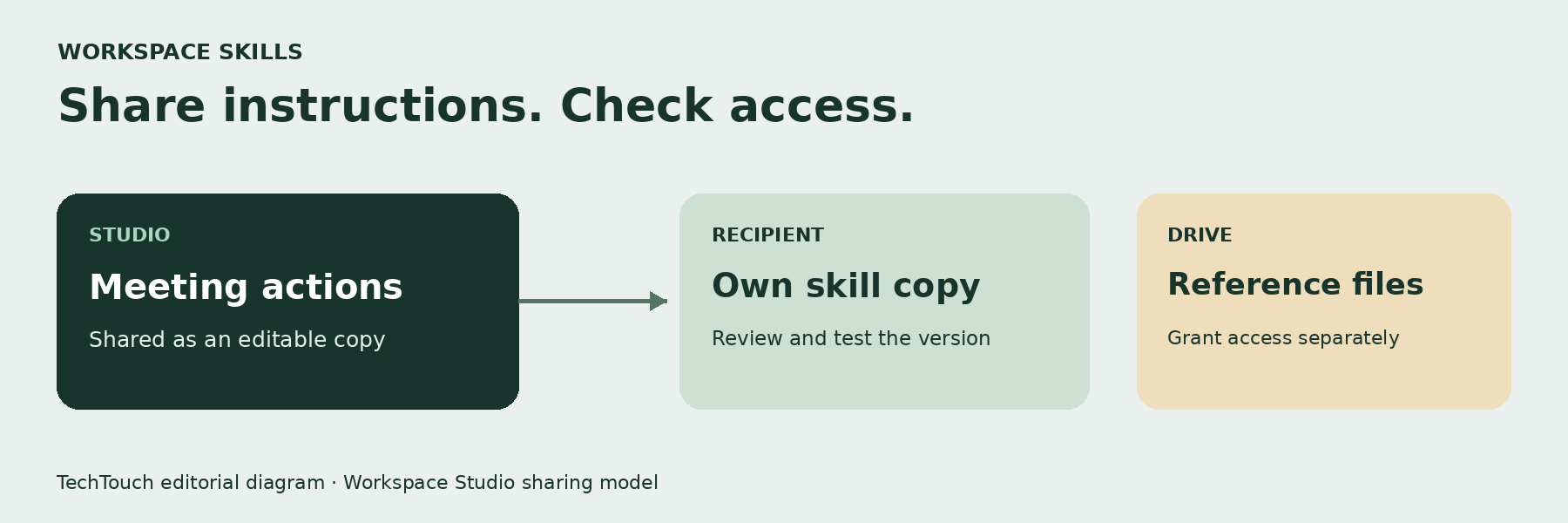
TechTouch diagram showing that Studio shares a skill copy and Drive references require separate access
TechTouch diagram showing that Studio shares a skill copy and Drive references require separate accessOriginal image: TechTouch ↗
SOFTWARE · WORKPLACE AI

Google rolls out Workspace Skills for Gemini and Studio. Here is how to test one before sharing

Workspace Skills roll out in November 2026. Check access, understand how copies and reference files are shared, and test a skill with five fictional meeting notes.

Google reported on November 10, 2026 that Workspace Skills were rolling out to Gemini in Workspace and Workspace Studio. Skills let teams reuse instructions and reference material. A meeting summary draft is a small first task that exposes how a skill handles missing facts and inaccessible files.

The key points

  • Rapid Release began November 9, with Scheduled Release beginning November 30
  • Sharing creates a copy and Drive permissions are managed separately
  • Test on fictional inputs before connecting a flow

A skill stores instructions for repeatable work

Google describes creating and testing skills in Studio and drafting collaboratively in Docs. Once enabled, a skill can be selected by Gemini or invoked with @. The rollout covers invocation on the web in Gmail, Docs, Slides, Drive, Chat and Studio, plus mobile Google Chat. Sheets and Meet are outside the launch scope. Prompts and skill instructions currently support English.
Availability depends on edition and release track

The November 10 announcement gives November 9 for Rapid Release and November 30, 2026 for Scheduled Release, each with up to 15 days of gradual visibility. Listed editions include Business and Enterprise Starter, Standard and Plus, Google AI Pro for Education and AI Expanded Access for users aged 18 or older. Administrators can disable access at domain, organizational-unit or group level. Check the existing account’s track and policy before planning a team rollout.

Test the instructions with fictional meeting notes

For a TechTouch example, create a skill called Meeting actions to draft a task list. Put these instructions in the Studio editor and use the test flow with the fictional inputs in the table below.

From the supplied meeting notes, draft a table with Action, Owner, Due date and Evidence. Copy names and dates only when stated. Mark missing fields as Unspecified. If a referenced file is unavailable, say which evidence is missing. Return a draft for human review.

Read the Evidence column first. If a name or deadline has no support in the note, revise the instruction or return the draft for review. Save failed examples as well as successful ones so the team can repeat the same checks after editing the skill.

The worksheet below contains five fictional English notes. Run the same instruction on each note separately and record the actual output, any errors, and the skill version. Two additional cases check that an unaccepted proposal stays out of the action list and one task’s due date does not carry over to another task. Mark a case as passed when the actions, owners, dates and evidence match the fixture. For an inaccessible file, the draft should identify the file and leave dependent conclusions open.

Check copies and permissions from a recipient account

Studio shares an independent copy that the recipient can inspect, edit and enable. Updates to the original do not propagate to copies already saved. Drive references require their own access grants. Record the version, date and owner on distributed instructions. Test once as a typical recipient and once with an account that cannot open a referenced file, then compare the output against your expected behavior.

Check each flow when moving from Gems

Google’s administrator guide treats Workspace, the Gemini app and Gemini Enterprise as separate skill environments. The planned 2027 automatic Gem migration creates drafts in the Gemini app. For Studio, review the configuration and reference files on that platform. If a flow uses Ask a Gem, consult Google’s transition guidance and capture a known output for comparison. For this meeting example, start with a manual run, produce a draft, and require human review before adding a message delivery or scheduled step.

Details and limitations

CaseFictional inputExpected result
Complete factsNok will deliver the report draft on November 20A row with the stated owner, action and date
Missing factsThe team will deliver the report soonOwner and date marked Unspecified
Reference unavailableThe recipient cannot open the reference fileIdentify the missing evidence and omit conclusions that require it

Things to know and check

  • Confirm edition, release track and administrator policy
  • Run the worksheet cases and record failures.
  • Label distributed copies and test reference permissions
  • Review the draft before adding delivery or a schedule

Sources used for verification

Vendor facts are separated from TechTouch guidance. Features, pricing, and commercial terms may change, so check dates and conditions at the original source.

  1. Google Workspace Updates · 10 November 2026
  2. Google Workspace Admin Help · updated 9 November 2026
  3. Google Workspace pricing · checked 11 November 2026
Our editorial approach

Frequently asked questions

Can the skill instructions be in Thai?

The launch guidance lists English for prompts and instructions. Check updated availability before planning Thai-language use.

Does editing the original update the recipient’s skill?

Recipients keep independent copies. Share the new version and test the copy they use.

Agent Skills format and portabilityGemini analyzes Google Forms responses