NotebookLM Is Now Gemini Notebook: How It Differs from Notebooks in Gemini
Understand the Gemini Notebook rename, how it differs from Notebooks in the Gemini app, and which workspace fits organizational knowledge work.
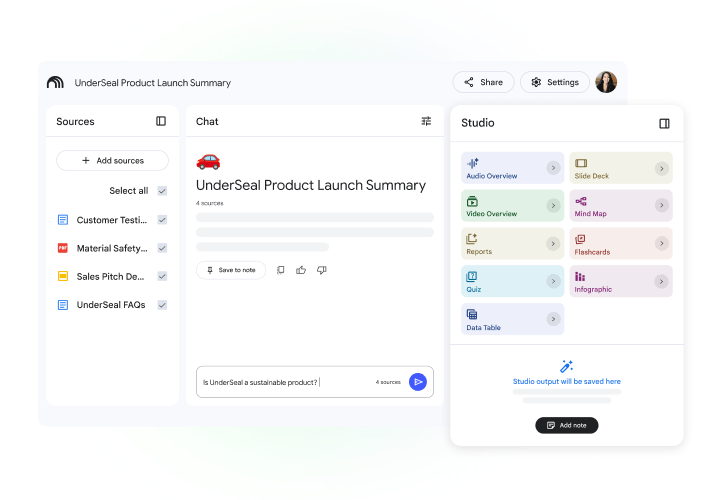
Google has renamed NotebookLM to Gemini Notebook. It remains the source-grounded research assistant that answers with citations, while Notebooks in the Gemini app are project knowledge spaces combining chats, files, and instructions. The two can sync, but their primary jobs remain different.
Best for: Teams using Gemini or Google Workspace that need to choose between persistent project context and deeper source-based research.New name, source limits to check
Google identifies Gemini Notebook as the new name for NotebookLM. Check limits before importing documents.
- Words per source
- 500,000
- Per uploaded file
- 200 MB
- Sources per notebook · Free
- 50
Limit for each source
Uploaded files must also meet the size limit
Check account limits for other plans
Compare before deciding
A new name, with the same core purpose
Google Workspace confirms that NotebookLM is now called Gemini Notebook. The plural Notebooks label still refers to project knowledge spaces in the Gemini app, so context matters: Gemini Notebook focuses on selected sources, while Notebooks in Gemini maintain ongoing project context.
Which one should an organization start with?
Use a Notebook in Gemini when the goal is to keep chats, instructions, and project files together. Use Gemini Notebook when teams must review policies, tenders, reports, or manuals and trace answers back to the supplied material.
Permissions still come first
Before sharing a notebook, review file ownership, audience, public links, and personal information—especially for contracts, customer material, and internal records.
Quotation preparation checklist
- Notebook owner and administrator
- Document classification
- Internal and external sharing rules
- Project context or source-grounded research need
- Workspace edition and enabled features
- Output review and approved-record process
Frequently asked questions
Was NotebookLM renamed?
Yes. Google now calls it Gemini Notebook. Notebooks in the Gemini app remain project knowledge spaces that can connect and sync with Gemini Notebook.
Can Notebooks in Gemini replace Gemini Notebook entirely?
No. They overlap in context and files, but Gemini Notebook is purpose-built for source-grounded analysis and generated study or briefing outputs.
How is Gemini Notebook purchased for business?
Google says Gemini Notebook is included in Google Workspace, with higher limits or features depending on the edition. Confirm the edition, users, and data policy before procurement.
Sources used for verification
Vendor facts are separated from TechTouch guidance. Features, pricing, and commercial terms may change, so confirm the latest information at the time of purchase.