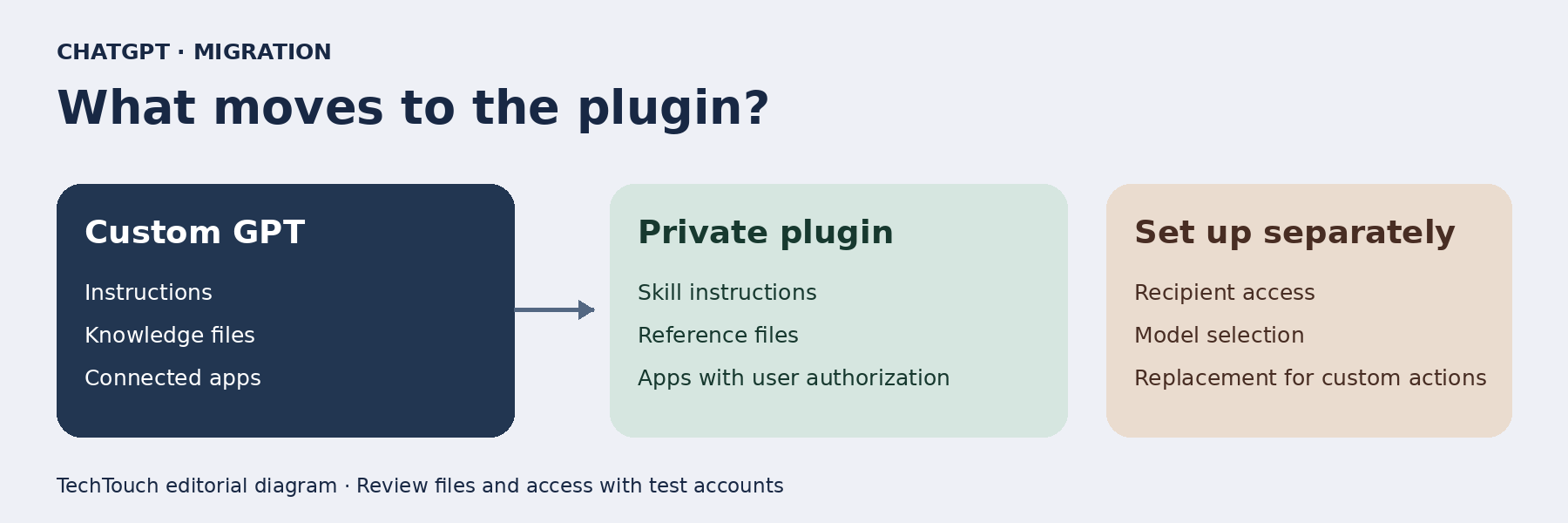
TechTouch diagram of instructions, files and apps that migrate from a Custom GPT and items configured separately
TechTouch diagram of instructions, files and apps that migrate from a Custom GPT and items configured separatelyOriginal image: TechTouch ↗
SOFTWARE · CHATGPT

Custom GPTs are scheduled to retire December 11. How to test a replacement plugin

A Custom GPT migration guide with six acceptance cases for references, audience access and custom actions.

OpenAI’s guidance, checked on November 21, 2026, schedules Custom GPT retirement for December 11, 2026, with a later date for some workspaces. Creators can migrate when the option is enabled for their account. Test the replacement with its intended users before changing the link your team uses.

The key points

  • Check which workspace owns the GPT and which retirement date applies
  • Compare task outputs and user access separately
  • Validate replacement integrations before relying on them

The owning workspace determines the retirement date

OpenAI lists December 11, 2026 as the standard date and February 28, 2027 for FedRAMP and qualifying approved Enterprise deferrals. The later date does not cover every workspace. Check the owning workspace’s notice even when the GPT is used from another account. Affected Enterprise workspaces stopped new creation on October 26, with a FedRAMP exception. Users of somebody else’s GPT should check the creator’s replacement guidance.
Inventory the GPT before opening the migration flow

Check My GPTs in the account that created it for Migrate to plugin. The workflow uses the latest published version. Review pending edits before starting because the original becomes read-only once migrated. The FAQ describes instructions becoming a skill, knowledge files being copied and connected apps being added. Choose an available model separately and rebuild any custom actions you need. Existing conversations remain in history according to the FAQ. Standard Chat, including Instant, cannot currently run bundled plugin scripts. Reading a reference is not proof that code or file-generation tools can access the original file.

Run a task with an answer you can verify

In this TechTouch example, a fictional GPT summarizes a travel policy. Create two test files. The current one sets a 500 baht limit and the obsolete one sets 300. Ask both the GPT and the plugin whether a 450 baht trip is within the limit. Pass the case if the response cites the current file and explains the comparison of 450 with 500. The worksheet includes missing dates and unavailable files. For export testing, record the surface and client version separately from script-execution evidence. Where supported tools are available, open the downloaded CSV and check its columns, row count and 450/500 values. A filename in a response is not an exported file.

Use recipient accounts to verify access and actions

The migrated plugin starts private. Included apps still require account access and authorization. Use an approved test recipient and a test user outside the group. Record which account can open the plugin and which can read the reference. If your old GPT wrote to a work system, point the test at a stub that returns fictional results. Check the cancellation path before writes and verify that an unauthorized user is denied.

Use a Project for ongoing work with the same files

OpenAI’s Projects guide describes grouping chats, instructions and reference files. A Project fits work that continues in one place. Past GPT conversations stay in history and cannot be transferred into a Project through this setup. For a workflow that invokes tools across tasks, document the required actions, permissions and acceptable failure behavior before choosing the replacement.

Details and limitations

Work patternOptionEvidence before switching
Instructions and files for ongoing workSet up a Project and start a new chatVerify the references and sample answer
Reusable instructions shared with a teamMigrate to a plugin if eligibleVerify that intended users can install and invoke it
Calls through a custom actionConfigure a replacement integrationTest denial and approval with a mock write endpoint

Things to know and check

  • Confirm the GPT owner, workspace and applicable date
  • Record reference versions and known outcomes using fictional data
  • Test allowed and excluded recipients and app permissions
  • Have the workflow owner sign off before sharing the replacement link

Sources used for verification

Vendor facts are separated from TechTouch guidance. Features, pricing, and commercial terms may change, so check dates and conditions at the original source.

  1. OpenAI Help Center · Custom GPT retirement and migration FAQ
  2. OpenAI Help Center · Plugins in ChatGPT
  3. OpenAI Help Center · Projects in ChatGPT
Our editorial approach

Frequently asked questions

Can I migrate a GPT I only use?

Access as a user does not confer migration rights. Check the creator’s guidance or workspace administrator.

Does migration give everyone access?

Verify the recipient list, install permissions and app authorization with the intended accounts.

ChatGPT Personal vs BusinessTesting Google Workspace Skills before sharing